
Signing an NDA Electronically: What Makes It Binding
Yes, you can sign a non-disclosure agreement (NDA) electronically in the United States, and it is generally as enforceable as a paper one. Federal law says a contract cannot be denied legal effect solely because it is electronic. What decides whether your NDA holds up is the evidence around the signature: who signed, that they meant to be bound, and that you can produce the final signed file. With SnapPact you can upload your NDA as a PDF or start from an AI-generated draft, send it to each signer, and keep an audit trail of the signing.
TL;DR
- An NDA signed electronically is generally valid under the federal E-SIGN Act and state law, for ordinary business use.
- Strong NDAs rest on evidence: a clear sign of intent, a way to show who signed, and a retrievable copy of the final document.
- Check the NDA itself first. If it says signatures must be handwritten, an electronic signature may not satisfy it.
- An electronic signature is not the same as a cryptographic digital signature, and you do not need the second to sign a standard NDA.
- SnapPact lets you upload a PDF or generate an agreement, send it to multiple signers with reminders, and keep an audit trail.
Table of Contents
- What an NDA is and who needs to sign it
- Is an electronically signed NDA legally binding?
- What the law does not settle for you
- Electronic signature vs. digital signature
- How to sign an NDA electronically, step by step
- Common problems with electronically signed NDAs
- Getting your NDA signed with SnapPact
- FAQ
- Sources
What an NDA is and who needs to sign it
An NDA is a contract in which one or both parties agree not to share certain information. It creates a legal duty: if someone breaks it, the other party can ask a court for a remedy. Freelancers use NDAs before sharing a client’s product plans. Small business owners use them with contractors, vendors and prospective partners. Individuals use them when a deal, a sale or a business idea involves private details.
Two shapes cover most situations:
- Unilateral (one-way) NDA. One side discloses and the other receives. Only the receiving party takes on the confidentiality duty, but both sides should still sign so the agreement is clearly accepted.
- Mutual (two-way) NDA. Both sides share information and both promise to protect it. This is the usual choice when you are exploring a partnership or a joint project.
Can anyone send an NDA? In practice, yes: any person or business that holds information worth protecting can put an NDA in front of someone. What matters is that the people signing have authority. If you are signing for a company, the signer should be an owner, officer or someone with the power to commit the business. An unauthorized signer is a problem that has nothing to do with the electronic format, and it can undermine the agreement just the same. If the stakes are high, have a lawyer review the NDA before anyone signs.
Is an electronically signed NDA legally binding?
Generally, yes. The federal Electronic Signatures in Global and National Commerce Act (E-SIGN) says that for transactions in or affecting interstate or foreign commerce, a signature or contract cannot be denied legal effect solely because it is electronic. A business NDA between parties in different states, or even one that touches interstate commerce in a small way, usually fits.
State law backs this up. The Uniform Law Commission describes the Uniform Electronic Transactions Act (UETA) as giving electronic records and signatures the same standing as paper writings and handwritten signatures when the parties agree to transact electronically. Most states have adopted UETA. The American Bar Association’s 2020 guidance explains that E-SIGN is the federal law, UETA applies in the states that adopted it, and the federal act generally does not displace consistent state rules. The same guidance notes that New York uses its own Electronic Signatures and Records Act instead of UETA, and that electronic signatures will ordinarily be effective there too.
For a deeper look at the rules by situation, our guide on whether electronic signatures are legally binding in the USA walks through them.
What counts as an electronic signature
The law is flexible about form. A law firm’s practice article defines an electronic signature as a sound, symbol or process attached to or logically associated with a record and made with intent to sign. The ABA’s guidance adds that signatures in emails, PDFs and signing services can qualify when tied to the agreement and made with intent to sign.
In plain terms, a typed name, a drawn signature or a click on an acceptance button can all work, as long as three things are true:
- The signer meant to sign.
- The signature is connected to this specific NDA.
- You can show both later.
What the law does not settle for you
E-SIGN and UETA make electronic NDAs valid. They do not make every NDA enforceable or every signing safe. Four points are worth checking before you send anything.
Everyone has to be willing to sign electronically
The federal statute states that parties are not generally required to accept electronic records or signatures. If the other side prefers ink, you cannot force them to sign electronically. For an NDA this rarely comes up, but ask when you send the document.
The NDA may require handwritten signatures
The ABA warns that an agreement may itself require manual signatures, so parties should check whether the contract prohibits electronic signatures. This is common when you reuse an old template or a form from a counterparty. Read the notice, amendment and signature clauses before sending.
Some documents are excluded
Wills are the best-known exception: the Uniform Law Commission notes that UETA and E-SIGN contain express exceptions for wills, which keep special execution rules. An ordinary business NDA is not in that category.
Consumer disclosures work differently
When an electronic record is used to satisfy a legal requirement to give a consumer information in writing, E-SIGN requires affirmative consent and specific disclosures. A freelancer-to-client or business-to-business NDA is not that situation, but it is a reason not to assume the rules are identical for every document type.
Electronic signature vs. digital signature
People search for both terms, and they mean different things.
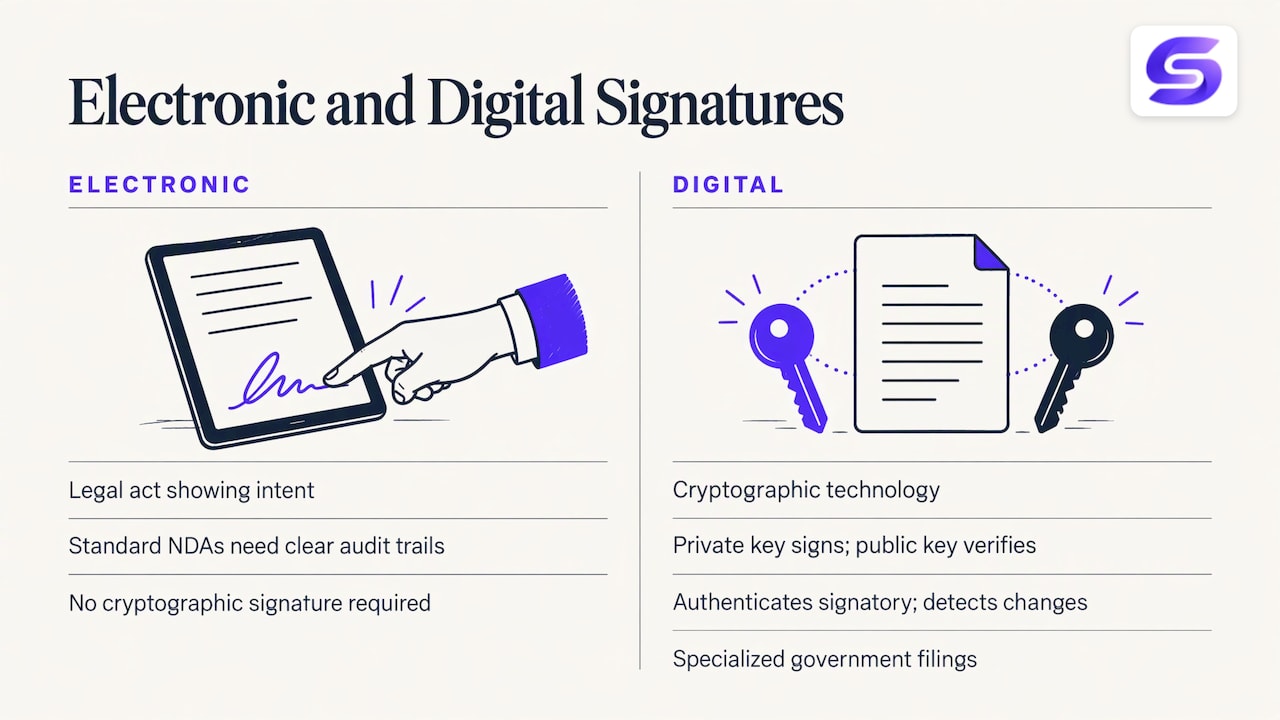
An electronic signature is the legal concept: any electronic act that shows you intended to sign. A digital signature is a specific technology. NIST’s Digital Signature Standard (FIPS 186-5) describes digital signatures as using cryptographic algorithms to authenticate the signatory and detect unauthorized changes. Signing uses a private key that must be kept secret, and verification uses the matching public key. That standard is the one the federal government uses for digital signatures.
For a standard NDA between a freelancer and a client, or two small businesses, an electronic signature with a clear audit trail is what you need. Cryptographic digital signatures matter more in specialized settings such as government filings, and an NDA does not require one.
How to sign an NDA electronically, step by step
Here is the routine, with where each step tends to go wrong.
1. Get the right NDA in front of you
Start with an NDA that fits the situation: one-way if only you are disclosing, mutual if information flows both ways. Identify the parties by their full legal names, define what counts as confidential, set how long the duty lasts and name the state whose law governs.
Where it goes wrong: a vague definition of confidential information, or a wrong company name, can weaken the agreement long before anyone signs. If you do not have a draft, SnapPact’s AI agreement generator builds a customized agreement from simple questions and includes document review. If you already have an NDA as a PDF, you can upload it instead.
2. Prepare the document for signing
Place a signature field for each signer, plus date fields. With SnapPact you can upload and edit your PDF, add fields and set up multiple signers in the same workflow. If you send NDAs often, reusable templates save you from rebuilding the same document each time.
Where it goes wrong: missing fields. A signature page with no date, or one signer’s block left off, creates gaps you will have to explain later.
3. Send it to the right person
Use the email address of the person who has authority to sign, and say in your message what the document is. Our guide on sending a PDF for electronic signature covers the sending side in detail.
Where it goes wrong: sending to a general inbox or to someone without authority. The agreement may be signed but still be challenged. SnapPact’s signing reminders nudge people who have not yet signed, so you are not chasing by hand.
4. Let each signer show clear intent
The signer should be able to see the whole NDA and take a deliberate action: typing a name, drawing a signature or clicking to accept. Nolo’s practical guidance lists these options and stresses that the signer should clearly indicate agreement to be bound.
Where it goes wrong: a signature that is not clearly linked to the final NDA. A law firm article on enforceability says that in a dispute you need evidence that the party actually affixed the signature and intended to be bound. A signing flow that records each signer’s action in an audit trail, which SnapPact provides, gives you that record in one place.
5. Keep the signed record
Save the completed NDA and its audit trail, and give the other party a copy. Nolo recommends that you keep a copy and give the other party a copy or instructions for getting one. Being unable to retain or reproduce the signed record is one of the common reasons electronic agreements get challenged.
Where it goes wrong: leaving the only copy in an email thread. Keep the NDA with your other agreements in one document library so you can find it years later, when a dispute would actually arise.
Common problems with electronically signed NDAs
Most failures come from a short list, and none of them are about the technology:
- Weak evidence of intent. The signer later says they never agreed.
- Uncertainty about who signed. The email address belonged to someone else, or the signer lacked authority.
- No clear link between the signature and the final text. The document changed after signing, or an earlier draft was signed.
- No retrievable record. The signed file is lost or cannot be reproduced.
- A clause requiring manual signatures. The NDA itself rules out electronic signing.
These are the challenges a law firm’s enforceability article lists, and it adds that a defective underlying NDA or an unauthorized signer can cause problems regardless of format. That is why the first step, a well-drafted NDA, matters as much as the signature.
A quick pre-send checklist helps:
| Check | Why it matters |
|---|---|
| Full legal names of all parties | Avoids disputes over who is bound |
| Signer has authority | An unauthorized signer can undermine the agreement |
| Definition of confidential information is specific | Vague terms are hard to enforce |
| No clause demanding handwritten signatures | Electronic signing could fall outside the contract |
| Signature fields and dates on every signer’s block | Prevents gaps in the record |
| Plan to store the final PDF and audit trail | You can reproduce it in a dispute |
Getting your NDA signed with SnapPact
SnapPact is built for people who sign NDAs and other agreements without wanting an expensive subscription. You can upload a PDF or start from an AI-generated agreement, edit it, send it to multiple signers, send reminders and keep an audit trail, all in one workflow. NDAs sit alongside the other documents SnapPact supports, such as independent contractor agreements, service contracts and rental agreements.
Pricing is flexible. You can pay as you go with a single credit at $2.49 per credit, with no mandatory subscription, or choose one of the optional monthly plans (Starter, Growth and Pro). See the pay-as-you-go options for the details, or go straight to uploading and signing your PDF.

If you work with contractors, our guide to creating a freelance contract pairs well with an NDA, and the guide on signing a contract electronically covers the signer’s side.
FAQ
Can an electronic signature be legally binding on an NDA?
Yes, in general. Federal law provides that a signature or contract cannot be denied legal effect solely because it is electronic, for transactions in or affecting interstate or foreign commerce. State laws such as UETA support the same result. Check the NDA itself for any clause requiring handwritten signatures.
Can anyone send an NDA?
Anyone with information to protect can ask another person to sign one. What matters is that the people signing have the authority to bind themselves or their business, and that the terms are clear. For significant deals, have a lawyer review the document before it goes out.
What is the difference between a digital signature and an electronic signature?
An electronic signature is any electronic act showing intent to sign, such as a typed name or a click. A digital signature uses cryptography, with a private and public key, to authenticate the signer and detect changes to the document. A standard NDA only needs an electronic signature.
What records should I keep after signing an NDA electronically?
Keep the final signed PDF and the audit trail that shows who signed and when, and make sure the other party has a copy. Store them where you can retrieve them years later. Being able to reproduce the signed record is central if the NDA is ever challenged.
Sources
- 15 U.S.C. § 7001: General rule of validity
- Current Acts: E, Uniform Law Commission
- Comment Concerning Use of Electronic Signatures, American Bar Association (2020)
- Everything to Know About Electronic Contract Signing, Nolo
- Electronic Signatures, Agreements & Documents: The Recipe for Enforceability, Lowenstein Sandler
- Digital Signature Standard (FIPS 186-5), NIST
Recommended
General information, not legal advice. Requirements differ between Canada and the United States and by province or state.