
ESIGN Act Compliance: What Freelancers and Small Businesses Must Do
To be ESIGN compliant, an electronically signed contract needs four things: a signer who intended to sign, a record that is kept and can be reproduced, a consumer consent step when the law requires information to be given “in writing” to a consumer, and a process that can show who signed what. Most freelancer and business-to-business contracts only need the first two plus good evidence. We built SnapPact around that routine: you upload a PDF or generate an agreement, send it to one or more signers, and keep an audit trail and the signed document in one place.
TL;DR
- Federal law says a signature or contract cannot be denied effect solely because it is electronic, for transactions in or affecting interstate or foreign commerce.
- A valid e-signature is a sound, symbol or process tied to the record and adopted with the intent to sign.
- Consumer consent steps apply only when a law requires certain information to be given to a consumer in writing. Contracts between businesses or with freelancers rarely trigger them.
- You must keep an electronic record that stays accessible and can be accurately reproduced for as long as the law requires.
- The law decides whether a signature counts, not whose it is. Your process has to prove who signed.
Table of Contents
- What the ESIGN Act does
- What counts as a valid electronic signature
- When consumer consent applies
- Keeping the record
- Proving who signed
- A practical compliance checklist
- Exceptions and state differences
- Making it routine with SnapPact
- FAQ
- Sources
What the ESIGN Act does
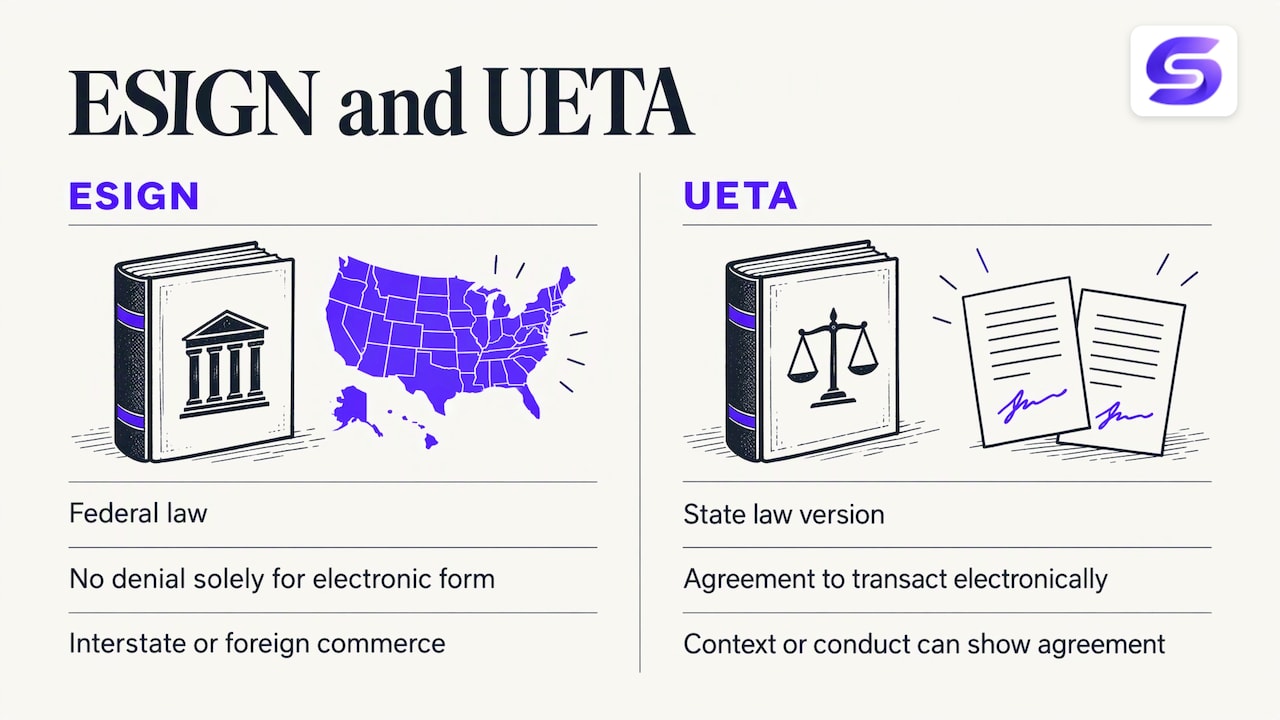
The Electronic Signatures in Global and National Commerce Act (ESIGN) is a federal law. Under 15 U.S.C. § 7001(a), a signature, contract or other record relating to a transaction in or affecting interstate or foreign commerce cannot be denied legal effect, validity or enforceability only because it is electronic. A contract also cannot be denied effect only because an electronic signature or record was used to form it.
The main provisions took effect on October 1, 2000, and record-retention rules followed on March 1, 2001, according to the FDIC’s examination manual.
ESIGN works alongside state law. Most states have adopted their own version of the Uniform Electronic Transactions Act (UETA). Under the version in Delaware’s code, for example, UETA applies only to transactions where each party has agreed to deal electronically, and that agreement can be read from context and conduct. A party can also refuse to do other transactions electronically. In practice you cover both laws with the same habits: clear agreement to sign electronically, a record you keep, and good evidence.
For a broader look at validity, see our guide on whether electronic signatures are legally binding in the USA.
What counts as a valid electronic signature
The statute’s definition, in 15 U.S.C. § 7006(5), is deliberately broad: an electronic sound, symbol or process attached to or logically associated with a record, and executed or adopted by a person with the intent to sign it.
Three practical points follow:
- No specific technology is required. ArentFox Schiff’s 2022 analysis notes that courts have upheld clickwrap agreements where users had reasonable notice of the terms and the click reasonably showed assent.
- Intent matters most. A typed name, a drawn signature or a click can work if it is clear the signer meant to be bound. Your signing page should say so plainly.
- Typed names in emails can count. A Texas appeals court held in January 2025 that a settlement agreement reached by email, with typed names, automatic signature blocks and express agreement language, was signed, as reported by DLA Piper. That is a Texas result, but it shows why a deliberate signing step beats an informal email thread.
Because intent is the test, a structured signing flow is easier to defend than a screenshot pasted into a PDF. With SnapPact you upload and sign a PDF, prepare the signature fields, and send it to signers with reminders, so each person takes a clear signing action.
When consumer consent applies
This is the part of ESIGN that trips people up, and it is narrower than many assume. Consent rules apply when a statute, regulation or other rule of law requires that information about a transaction be provided to a consumer in writing. If that is not the case, for example in a freelance agreement between two businesses, the consumer consent flow generally is not what makes your signature valid.
When it does apply, § 7001© says you may use an electronic record only if the consumer affirmatively consented and has not withdrawn consent. Before consenting, the consumer must get a clear and conspicuous statement of:
- The right to receive the information on paper and the right to withdraw consent, including any conditions, consequences or fees.
- Whether consent covers one transaction or identified categories of records.
- How to withdraw consent and update contact information.
- How to get a paper copy, and any fee.
The consumer must also be told the hardware and software needed to access the records, and must consent electronically in a way that reasonably shows they can access them. If those requirements change materially, you must disclose the change and get consent again.
Examples where it matters
Financial disclosures are a common case. The NCUA’s guide explains that the Federal Reserve Board adopted uniform electronic delivery standards in 2007 and that rulemaking authority later moved to the CFPB, with some CFPB rules allowing electronic delivery without ESIGN consent in specified cases.
Text-message marketing is another. A federal court in Maryland held that when the Telephone Consumer Protection Act requires prior express written consent, ESIGN disclosures and consent must come first if you collect that consent electronically, per DLA Piper’s 2024 roundup.
If your business sends required notices to individuals, build the consent screen into your process and design the demonstrate-access step carefully. Document automation can help once the steps are mapped out.
Keeping the record
Under § 7001(d), a retention requirement is met by an electronic record that accurately reflects the contract, stays accessible to everyone entitled to it for the period the law requires, and can be accurately reproduced later. Electronic records can also satisfy “original form” requirements.
For you, that means:
- Store the final signed document, not just a draft.
- Make sure every party can get a copy.
- Know how long the law requires you to keep this kind of record. Tax, employment and lending records have their own periods.
- Keep the audit trail with the document.
Some regulated sectors add stricter rules. The NCUA’s procedures, for instance, require credit unions to keep a single authoritative copy of certain transferable loan records that is unique, identifiable and unalterable. Most freelancers will never face that, but it shows why the retention rule matters.
Proving who signed
ESIGN decides whether a signature qualifies as a signature. It does not decide whether it was really your client’s. ArentFox Schiff’s attorneys call authentication and repudiation risk the real-world gap: without a standard process, enforcing an agreement can become hard.
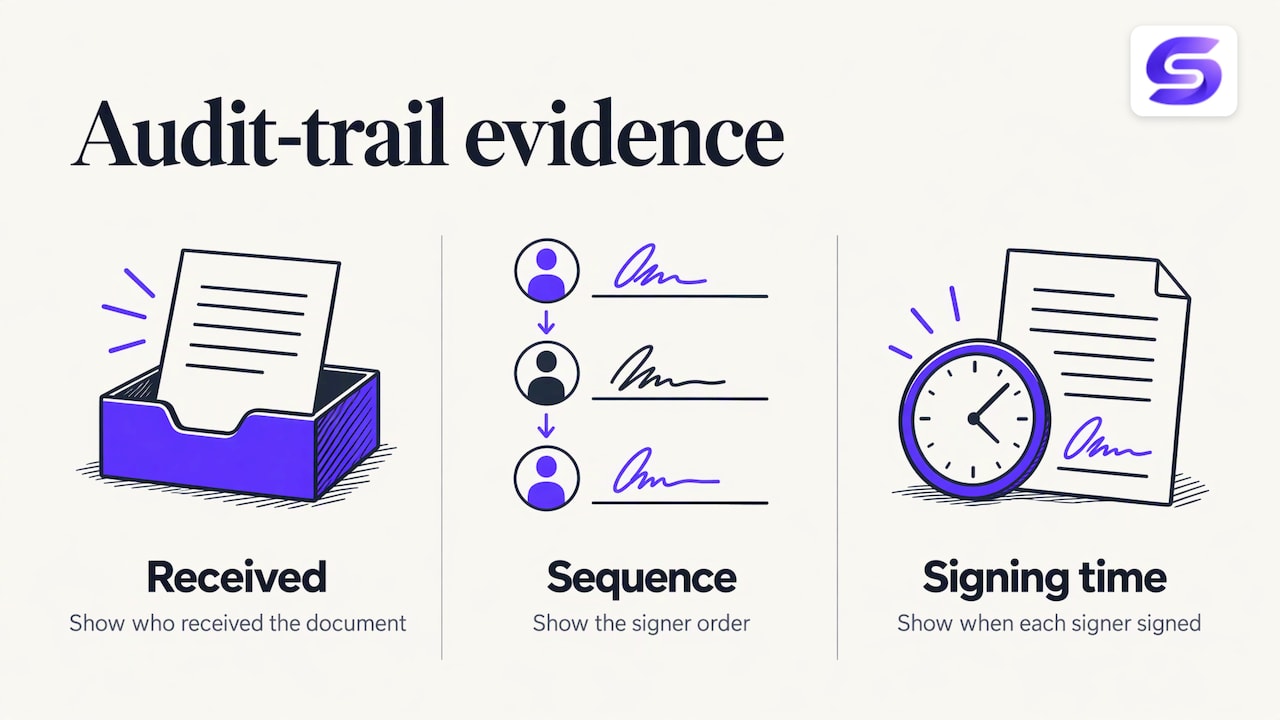
A signing tool with an audit trail helps close that gap. SnapPact records the signing activity, supports multiple signers, and lets you set a signing order, so you can show who received the document, in what sequence, and when they signed.
A practical compliance checklist
Nolo’s guide to electronic contract signing lists the practical habits: get signers’ consent, make clear that signing means agreeing to be bound, let anyone who wants paper opt out, explain how to withdraw consent, keep copies and give signers copies. Put into a routine:
- Identify the parties and use the email addresses they actually use.
- Confirm they agree to sign electronically. A line on the signing page is enough for most business deals.
- State that signing binds them.
- Check whether a consumer notice law applies. If so, run the full consent flow first.
- Send for signature with a clear order and reminders.
- Store the signed copy and audit trail, and send every party a copy.
- Note the retention period for that document type.
If you use e-contracts regularly, have an attorney review your practices and disclosures. That is especially wise if you deal with consumers or regulated industries.
Exceptions and state differences
ESIGN has exclusions, and state rules vary, especially for notarization and estate planning. States keep updating their laws: Colorado’s HB1248, effective May 1, 2024, allows electronic execution of certain non-testamentary estate documents but not wills. For notarized documents, ESIGN says the requirement is met if the notary’s electronic signature and required information are attached to the record, and remote online notarization rules differ by state. Check your state’s current rules before signing anything that needs a notary.
Making it routine with SnapPact
If you want the checklist built into your workflow, SnapPact lets you start with an uploaded PDF or an AI-generated agreement, edit it, add signers, send reminders and keep an audit trail. You can pay per contract with a single credit at $2.49 with no mandatory subscription, or choose a monthly plan.

If you need to draft first, the AI agreement generator builds an agreement from a few questions. For freelancers, our guide to creating a freelance contract is a good starting point.
FAQ
Is an e-signature legal for every contract?
Most commercial and consumer contracts qualify under ESIGN. Some document types are excluded or carry extra state rules, such as wills and certain notarized records. Check your state’s rules for those.
Do I need consumer consent for a freelance contract?
Usually not. Consent applies when a law requires information to be provided to a consumer in writing. A business-to-business agreement generally does not trigger that. Still, clearly record that all parties agreed to sign electronically.
How long must I keep a signed contract?
For the period the law requires for that type of record. ESIGN only requires that the electronic copy stay accessible and reproducible during that time. Ask your attorney or accountant for the period that applies to you.
Does a typed name count as a signature?
It can, if it was adopted with intent to sign. A Texas court reached that result for an email exchange in 2025. A dedicated signing flow gives you stronger evidence.
Sources
- 15 U.S.C. § 7001: General rule of validity
- 15 U.S.C. § 7006: Definitions
- FDIC: Electronic Signatures in Global and National Commerce Act
- NCUA: E-Sign Act guide
- Delaware Code: UETA
- ArentFox Schiff on JD Supra: E-signatures
- DLA Piper eSignature news, May/June 2024
- DLA Piper eSignature news, Jan/Feb 2025
- Nolo: Electronic contract signing
Recommended
General information, not legal advice. Requirements differ between Canada and the United States and by province or state.